Instructions for installing the "Mod" was great for Google Nexus 7, after Root

Few days ago we have tutorial root and install a ROM / mod for Google Nexus 7  and now I would like to introduce you to some of the mod as well as little tricks to customize this tablet just the way you more . First mod will be to help raise additional power menu . I will also talk to the manager flash enhanced sound ( DSP Manager ) for Google Nexus 7, the navigation bar is hidden when not needed , a Google Apps tweaked a transparent or black very nice jet . Finally, a tool interface tweaks and features of the system .
Instructions for installing the "Mod" was great for Google Nexus 7

Read more »

Guide to upgrade or reinstall for iOS iPhone / iPad do not lose data

When users restore the operating system in use, the first problem are worried the loss of data , especially when devices are " hanging apples " . Hackers have developed a tool let you backup all data from contacts , messages , applications to data and settings to rectify this situation .

Guide does not restore lost data for all life iPhone / iPad while hanging apples
This application works on DOS Windows , currently there is no version for the Mac OSX operating system . Users can use the tool to perform the entire data flow from the older operating systems such as iOS 6.1.3 then upgrade to iOS 7 . There have been many users confirm this tool can help complete computer upgrade iOS without worrying about data loss , and the machine is fully suspended apple can save the data .
Guide to upgrade or reinstall for iOS iPhone / iPad do not lose data
Read more »

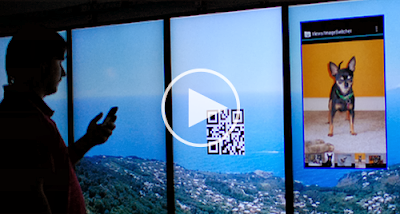
Google Open Project, the project makes sharing content from your Smartphone to an external monitor

Google is currently testing a project that allows users to "slideshow " What content from any smartphone 's screen to an external monitor . This project named Open Project and Google engineers see it as a framework to use as a standard in the future . Open Project works like this: when you're watching something that feels or smartphone , you can use a special software to scan the QR code on an external display , such as TV . Meanwhile, the QR code will be transformed into a rectangle representing the size and position of the frame which we projected onto prepared . Using the camera on a smartphone , users can move this rectangle to the desired location , using two fingers to zoom sizes . When you're satisfied , simply click a button is all that is displayed in the app on the smartphone will be shared to the TV .
 Google Open Project, the project makes sharing content from your smartphone to an external monitor
Google Open Project

Read more »

LG G Pro Lite Dual, 2 Sim Card, 5.5 inch Full HD screen, $ 400 price

According to sources from Hi - tech Tech.Mail.Ru pages of Russia , it is likely LG will introduce a low-cost variant phablet called LG Optimus Pro G Pro Lite Dual . The device will still own True HD IPS screen 5.5 inch 1080p but the camera will be 8 megapixels instead of 13 megapixels as G Pro , but still including BSI sensor . Besides , chances of processors G Pro Lite Dual will be cut down to a lower level to match the machine offset costs but also adds support 2 SIM .
LG G Pro Lite Dual, 2 Sim Card, 5.5 inch Full HD screen, $ 400 price
Designing the front of the LG G Pro Lite Dual .

Read more »

Root Xperia E Guide New Firmware 11.3.A.2.23 (not unlocking the bootloader)

Prerequisite Root Xperia E:
  • Xperia E phone running Firmware 11.3.A.2.23
  • Having basic knowledge about FlashTool. (See more here FlashTool)
  • Knowing Sony use PC Companion or Update Service to repair the firmware in case of an error, because I will not be responsible for any problems.

Preparation:

Procedure: ( kernel as normal flash through flashmode FTF, no need to unlock the bootloader)
  • Using FlashTool, flash kernel 11.3.A.0.47.
  • Apk file to install Framaroot, then open it, and click the Install button SuperSU Gandalf, will be notified root successfully. Reboot the phone to find out SuperSU menu.
  • Using FlashTool, flash kernel 11.3.A.2.23.
  • E Launch Xperia phone and enjoy.
Root Xperia E Guide New Firmware 11.3.A.2.23
Read more »

Tools guide full Root Sony Xperia Z1

Shortly after the original firmware of the Sony Xperia Z1 L39h announced only a few hours after one of the members of the Xda forum for technology that they were able to successfully root the latest models from Sony, but this time with the Xperia Z1 another relatively simple way without too many operations you can follow the instructions below

Tools Download and install here >> Phone Xperia Z1 does not have a driver, it will automatically load >> Once installed just click under the guidance of the software installation is complete. Note: Remember to usb debugging
Tools guide full Root Sony Xperia Z1

Tools guide full Root Sony Xperia Z1

Guide to Minion lock screen for Android

Once done, lock your screen will look like below and unlock by pulling the teeth of the Minion below:
Guide to Minion lock screen for Android
Guide to Minion lock screen for Android 
Tools needed:
  • WidgetLocker LockScreen
  • UCCW
  • Resources (in this wallpaper in 1280 * 720 format, you can resize to the correct format for your phone, including HD also is not afraid to break; Mouth.wltheme.zip cop Minion file to sdcard / data / com.teslacoilsw.widgetlocker / themes; elegante_date.uccw copy files to sdcard / UltimateCustomClockWidget)
  • Font

Conduct
  • install WidgetLocker
  • Open WidgetLocker, hold on everything available on the screen -> Remove
  • In WidgetLocker settings:

Lock & Feel -> Hide Notification Bar
Advanced -> Widget Overlap
Look & Feel -> Layout -> 12 * 12
Look & Feel -> Alternative Wallpaper -> Select Wallpapers -> Choose wallpaper above Minion
  • Back on the main screen of WidgetLocker
  • Hold the position you see in the image Minion teeth -> Add Custom Slider -> Choose the theme Minion, and then hold out for the right to resize image
  • Hold on main screen WidgetLocker -> Add UCCW -> select theme Minion
  • Click date just watches more, adjust the position, font, such as in image

The fix for font UCCW who do not know:
- Created 1 fodel external memory card fonts sdcard / fonts
- Unzip the downloaded font file on the sdcard / fonts
- Click on the clock date just added, click on the time and place chosen for the background # 1 controls the controls you swipe to the right to select the font # 4 -> done